Skip to main content Skip to search

News

Confirmation of Certificate

ePRINTit SaaS is now ISO 27001:2022 certified, setting a new standard for information security in the printing-and-payment solutions industry. Recognized as the ‘gold standard,’ this certification ensures the highest level of data protection for clients and IT systems.

The ISO 27001:2022 certification strengthens information security practices, simplifies security audits, and enhances trust between organizations and their service providers. ePRINTit SaaS continues to lead with secure and innovative solutions for enterprises worldwide.

What ISO 27001:2022 Certification Means for Libraries

Partnering with an ISO 27001:2022 certified vendor like ePRINTit SaaS brings significant benefits to libraries. This certification ensures that all data, including sensitive user information, is handled within a robust security framework that meets the highest global standards.

Additionally, working with a certified vendor simplifies security assessment processes, providing librarians with peace of mind and reinforcing public trust in their ability to safeguard data. In an era of increasing cyber threats, this certification highlights a strong commitment to information security, ensuring that library staff and patrons alike can rely on secure, innovative solutions.

About ePRINTit SaaS ePRINTit SaaS offers cloud-based print, copy, scan, and payment solutions across sectors like education, libraries, and retail.

About ISO 27001 ISO/IEC 27001 is the global standard for best practices in information security management.

Read more

Mobile Printing – ePRINTit

Simplified Mobile Printing Submissions
Secure, Fast, and Easy-To-Use


Easy To Use

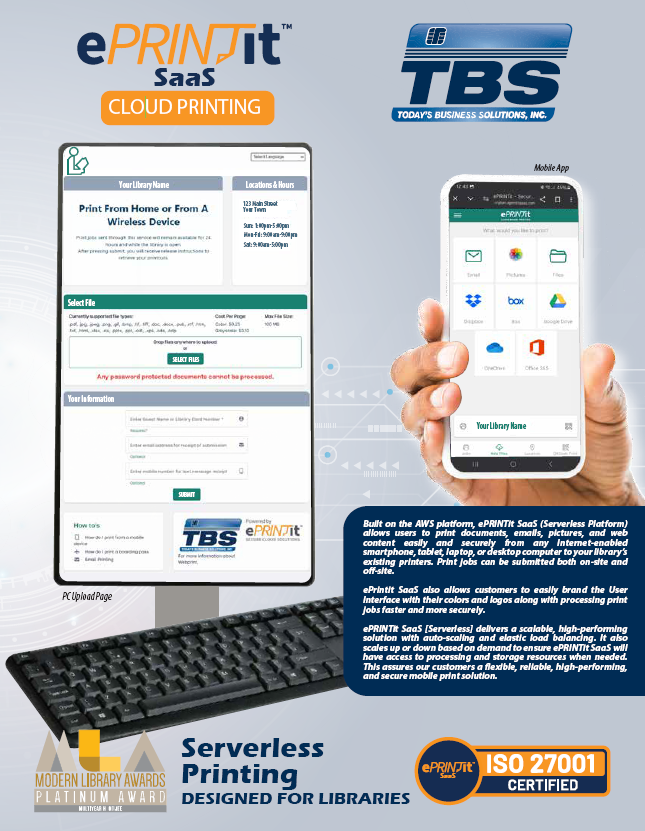
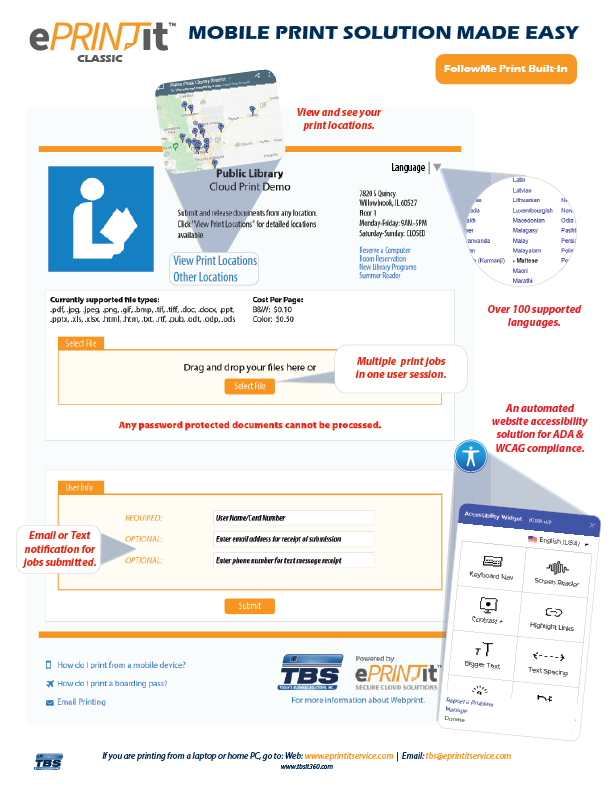
Provide your community with the latest services and technology! ePRINTit allows users the ability to print from home, the office, or while on the go, using Android, iOS, or any web browser to print to their library, through an easy-to-use interface.

Libraries are no longer required to have dedicated computers to print. Users can use their own office/home computer or mobile device to send their print jobs to the ePRINTit secure end-to-end encryption (256 Bit).

• Use a Library Card to Submit and Retrieve Print Jobs
• Guest Printing Made Easy
• Eliminates Waiting for Processing of Print Job – Text
• Optional Email Confirmation of Print Job
• Multiple Print Jobs in a Single Submission
• Follow-Me Printing
• Real-Time Cost Accounting
• Submit Jobs from Anywhere
• Displays Supported File Types
• Web-Based Staff Portal
• Immediate Rejection of Non-Supported Files


Easy to Implement and Support

• Eliminate Printer and Driver Setup
• Automatically moves print jobs to any location
• No Server Required
• Consistent User Interface for both Android and iOS
• Chromebook Printing Supported
• Cloud Storage Account integrations
(Google, DropBox, Box, OneDrive, Office 365)
• Secure end-to-end encryption (256 Bit)
• Operating System Independent
(Microsoft, Chromebook, Linux, Mac, etc.)
• Advanced Reporting of Pages Submitted vs Released

tbs logos classic

Explore Our Cloud Printing Solutions!

The world’s most secure and powerful cloud processing and printing system.


Education Printing – Enhance the campus technology experience for students and staff with our fully managed, turnkey solution.

Hospitality Printing – Turn your hospitality & retail business into an all-in-one service hub that offers convenient public printing.

Enterprise Printing – Enable anywhere, anytime, any device printing for employees across both public and private networks.

Live, Work, and Play On-The-Go with ePRINTit™! Super-charge print management with full automation in a secure hosted environment.

Pay for Print Solution – Innovative print management solution that you do not have to host and manage. The system runs itself with unlimited document processing power, allowing users to print anywhere on demand.

Cost Savings – The use of cloud printing allows users to print on-demand from any public print station, saving you the cost of having to purchase a personal printer or re-purchase paper, ink, toner, etc.

Print Security – Enjoy secure file access and document printing! All documents are securely encrypted during both rest/transfer and are only released at the print station once users have been authenticated.

Ease of Use – Enable secure access to mobile devices, OneDrive, Office 365, Dropbox, Google, Box, and email accounts, all from one platform! Effortlessly manage all of your print jobs and save time.

Print from AnywhereBYOD – Bring your own device! Enable users to easily upload their documents to the ePRINTit cloud and securely retrieve their documents from any enabled ePRINTit print station.

Real-Time Reporting – Get real-time statistics and status updates of each ePRINTit print station at your location. Easily access up-to-the-minute reports and build a more cost-effective printing service.

Read more

Credit Card

TBS Provides the Ultimate All-In-One Cashless Solution

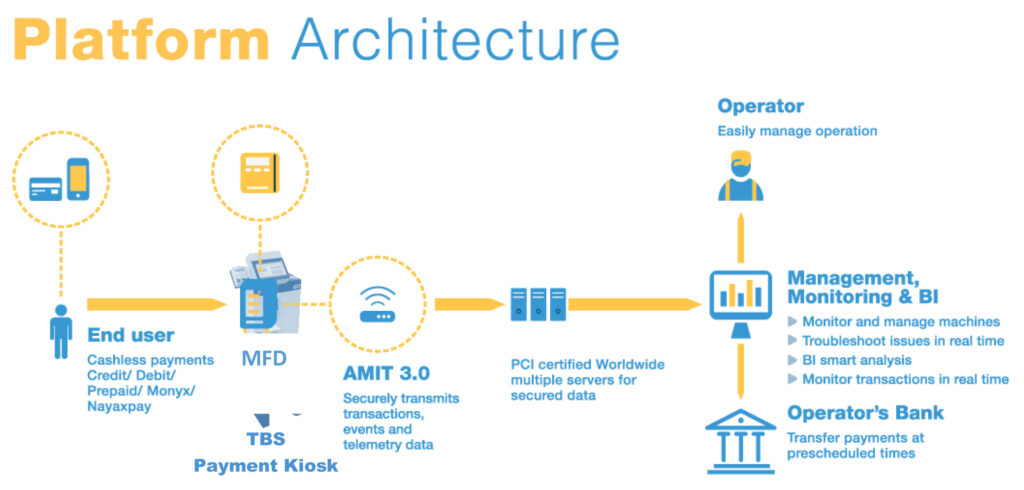
The TBS Payment Kiosks with Credit Cards are universally certified and designed to empower automatic/unattended machine operators with the latest technology and clearing solutions. Operators no longer need to concern themselves with the management or security of merchant or cellular accounts. The monitoring of these accounts and data security are included as part of this all in one cashless solution. This solution includes an online interface. Our software receives all the data from the cashless device and helps your staff manage and monitor every aspect of the operation. A key feature of the TBS Payment Kiosks with Credit Cards is the ability to centrally manage all your multifunction devices from one application. Business managers enjoy reliable data without having to rely on information provided by other personnel. One person can oversee a multitude of TBS9900 Payment Kiosks at a glance with drill-down capability for more detailed information. This means fewer resources are required to manage these devices.


Plug & Play

The TBS cashless payment solution is easy to install, simple to use, and compatible with all automated machine standards.

TBS takes care of all software updates remotely to ensure that your devices benefit from the latest technology and are up to date with payment standards and requirements. With TBS cashless systems, you can take advantage of our vast global experience and have your unattended machines up and running in no time.

  • Real-time updates and monitoring.
  • Once the hardware is installed, everything can be remotely managed through your network – software updates, management, unit preparation, etc.
  • Built-in SIM immediately connects to the network

Request Brochure

For product brochures, send us your info, by filling out the form and we’ll send you the most up to date brochures.

    I would like to get a brochure of Credit Card:

    [fm_carousel id=”1″]

    Read more

    Payment Kiosk – TBS 9900 Kiosks

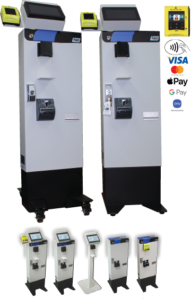
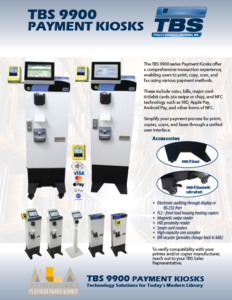
    The TBS9900 series of payment kiosks allow users to complete transactions for printing, copying, scanning, and faxing with coins, bills, and major credit cards, via swipe or chip as well as NFC technology which includes HID, Apple Pay, and Google Wallet, as well as other forms of NFC technology. The TBS99000 is a top-quality, reliable unit with complete metering, a high-security lock, and the ability to operate in pulse or serial modes. The TBS 9900 can be equipped with an MBD card reader. Pay for prints, copies, scans, and faxes through one user interface. Works seamlessly with a wide range of leading manufacturers. To verify compatibility with your printer and/or copier manufacturer, reach out to your TBS Sales Representative.

    Credit Card Features

    • Customers can now use major credit cards via swipe or chip, NFC technology, HID, Apple Pay, Google Wallet, as well as Student ID, and Library Card.
    • Affordable micro-transaction fee.
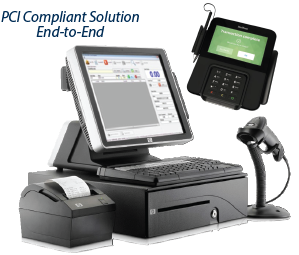
    • PCI compliant, alleviating any privacy or security concerns.

    Our towers allow you to set a different cost per cash copy at each controlled copier. Card accepting units also allow you to set a separate stored value debit card cost at each unit. Two price accepting lines are available to charge additional amounts for special features such as alternate paper sizes or color and black and white.

    Special Features

    In addition to standard pulse operation, TBS Towers are capable of serial communication with most network printing software. This will allow a multi-function device to serve as both a glass top copier and a network printer. Card accepting units can also be used as add value stations, allowing users to transfer coin or bill currency onto a stored value card right at the tower.

    Multi-Access Vending

    TBS towers control access to the usage of photocopiers, microfilm print readers, network printing, and a variety of other equipment. Our modular design allows for easy configuration as a:

    • Coin only reader
    • Coin and bill reader
    • Coin and card reader
    • Coin, card, and bill reader
    • Optional credit card reader

    These units are always upgradable to add additional functionalities.

    Features

    • Allows for any combination of coin, bill, and card vending
    • Programmable cash and card costs.
    • Allows for money to be inserted ‘upfront’ for uninterrupted operation
    • Advanced locking system
    • Bypass mode available with the use of key
    • Can interface with any MBD Card Reader
    • Adds value to cards
    • Controls access to MFD’s (Copy, Print, and fax functions), Microfiche, and related equipment
    • Integrates with Print Management software (call for listing)
    • Heavy-duty steel construction with a tamper-proof T-bar door lock
    • Allows users to insert multiple coins/bills and then make copies or print jobs until a value is depleted
    • Programmable cash cost per copy ($0.01 to $9.99)
    • UL-CSA Approved

    Coin Only Features

    • Accepts U.S. nickels, dimes, quarters, and dollar coins (Canadian, Mexican, or international coin changer available)
    • Self-replenishing change tubes
    • High capacity changer (optional)
    • Provides change in $1 coins (optional)

    Bill Acceptor Features

    • Accepts U.S. 1, 2, 5, 10 & 20 dollar bills
    • Optional Bill Recycler, provides change back in dollar bills

    Card Reader Features

    • Stored value debit card readers
    • Credit Card readers (Readers are optional and may be added at time of purchase or in the future.)
    • TBS 9900 Auditing
    • Electronic auditing through display or RS-232 Port (PC or Printer)

    Accessories

    • 9900 Stand (Floor stand as photographed)
    • CAB-XX Copier Cable
    • FL1—front load housing hosting copiers

    Request Brochure

    For product brochures, send us your info, by filling out the form and we’ll send you the most up to date brochures.

      I would like to get a brochure of Payment Kiosk:

      Read more

      CPad

      • Print Release No Longer Tied to a PC
      • Secure, Intuitive Touch Screen Print Release
      • Saves Valuable Floor Space
      • Control Copy and Print within the Same Device
      • Features the Core Functionality of PaperCut
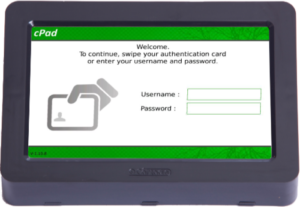
      • Supports Multiple Authentication Methods (Card, Username/Password, & ID Number/Code)
      • MFP Manufacturer Independent

      When connected to a printer or copier, the CPad network terminal provides access control and identification by card or login. This next-generation device, with its modern and clean design, is an attractive addition to your printing and copying environment.

      The Daily Advantages of the CPad

      • Replaces your release station PC – regaining that asset PC for customer use, while maximizing valuable floor space
      • Rapid identification using the barcode/RFID badge reader and ergonomic keyboard
      • A personalized interface for the identified user
      • Simple to use secure print release
      • Compatible with most printers and copiers on the market

      How the CPad Works

      The CPad brings all of PaperCut’s core functionality to output devices including  –

      • Secure Print Release
      • PaperCut’s “Find Me” Printing (release jobs from your queue at any printer)
      • Charging to Shared Departments/Accounts

      CPad works by locking the printer or copier until the user has been identified by PaperCut.

      Users interact with the CPad via a rich 7” high-resolution touch screen offering an intuitive interface. Printing and copying are tracked and reported to the PaperCut central server in real-time.

      For secure print release, users are presented with an on-screen list of print jobs and may release their jobs with one touch.

      User Interface

      • Intuitive touch screen interface quickly starts upon user identification.
      • Users can select the print job, print all, cancel job, and job detail options for documents in their release queue.
      • Users’ account balances before and after each operation are displayed on the CPad.
      • The CPad manages, prints, and copies on a single interface.
      • The CPad’s interface can be customized to display the logos and colors of your organization.

      Specifications

      • High Resolution 7″ Color Touch Screen
      • Real-time Responsive Touch Interface
      • Built-in Dual Port Ethernet 10/100 Base-T Hub
      • Dual USB Ports for Card Readers and Other Supported Hardware
      • External Power Supply
      • True 2.6 Linux Operating System
      • 128 MB Flash Disk, 64 MB RAM
      • Multiple USB Card Readers Supported
      • Cable Locking Cover Reduces Risk of Disconnection
      • Optional Stand

      Request Brochure

      For product brochures, send us your info, by filling out the form and we’ll send you the most up to date brochures.

        I would like to get a brochure of Cpad:

        [fm_carousel id=”1″]

        Read more

        Mobile Printing

        Secure Mobile Printing from Any Device

        Web-Print Enterprise is a solution that allows users to effortlessly print documents, emails, and web content from any internet-enabled smartphone, tablet, laptop, or desktop directly to your organization’s existing printers.

        Users can send documents to your printers from any location– inside or outside of your organization’s infrastructure.

        Benefits of Web-Print from TBS

        • Provides a centralized printing service by allowing users to print from any device or location and simply pick up their documents at the most convenient on-site printer.
        • Easy-to-use from any device, even for novice users.
        • Secure printing is available for all print methods. Print jobs can either be authenticated at the time of submission or secured upon release, depending on the print method.
        • Integrates fully with most print management solutions.
        • Removes device limitations, as users no longer need to login to a locally networked computer in order to print.

        User Authentication

        Web-Print Enterprise provides your organization with secure, authenticated printing from any device to your existing printers.

        The smartphone & tablet printing, web page printing, and universal print driver methods can authenticate against your existing LDAP or Active Directory to authorize or restrict printer access.

        Email printing is secured through a private release code.

        Smartphone & Tablet Printing

        With Web-Print Enterprise, users can print from their smartphones or tablets using our mobile print application.

        Users can search for a print location using criteria such as keyword, city, or location name, or by using the discovery feature to find the nearest print location.

        Upon authentication, print requests are sent to the selected printer.

        Web Page Printing

        The Web-Print Enterprise system includes a self-service website that allows printing without any print drivers. Simply authenticate yourself, choose a printer, set print options, and upload your document.

        Email Printing

        Users simply ‘forward’ any email message with attachments to the unique email address assigned to each printer. An automatic reply email is sent from Web-Print with a private release code that the user enters on a keypad at the printer to release their personal print job.

        Universal Print Driver (Optional)

        Users with advanced printing requirements can download and install a single print driver that works with all of your Web-Print configured printers.

        Features

        • Server Software: The back-end applications and web pages facilitate a unified printing experience for your organization.
        • Toolkits: To extend and customize your system, TBS includes programming interfaces and source codes for your intranet site.
        • Consolidate cost recovery: TBS has partnered with print management application vendors to ensure proper operations with your cost recovery solutions.
        • Scalable Solution: Designed to allow for growth as usage increases to accommodate thousands of users and print devices within a single deployment.
        • Web-Print is secure: All print data requests are transferred and encrypted using secure SSL communication.

        Web Print is a simple solution that does not require any special printers or hardware. Print to any printer, from any internet-enabled device.

        Request Brochure

        For product brochures, send us your info, by filling out the form and we’ll send you the most up to date brochures.

          I would like to get a brochure of Webprint:

          [fm_carousel id=”1″]

          Read more

          Point of Sale – MagnaPOS-L

          MagnaPOS-L is the first Point of Sale application for libraries. It is a complete point of sale solution built for Windows based systems that can turn any PC into a cash register.

          It allows you to pay patron fines and fees, process payment, control access to cash, and provide the reports you need to offer superior customer service.

          Whether you have one branch or many, MagnaPOS-L can provide a complete end-to-end solution.

          Key Features:

          • Interfaces directly with your ILS to access patron accounts
          • Process sales and refunds quickly and easily
          • Accept cash, checks, credit & debit cards, gift cards & more
          • Windows Based software that is fast and easy to use
          • Over 100 configurable options lets you choose the setup that is right for you
          • Built in barcode scanning allows quick information entry
          • Detailed reporting lets you keep track of transactions and more

          Manage Multiple Registers

          With MagnaPOS Branch Manager you can manage and report on the activity of multiple registers within a branch or location.

          • Manage items in inventory, and report on all branch activity from one central location
          • Track sales for the entire branch
          • Consolidate credit card processing from multiple registers

          Manage Multiple Branches

          Bring together sales information from across your organization with
          MagnaPOS Enterprise Manager. Featuring centralized management and
          reporting for an unlimited number of registers and locations it is the most flexible, cost effective way to view the big picture and keep all your branches running.

          • Track sales for all branches from one convenient location
          • Compare and contrast branch performance
          • Manage register configuration to conform to your policies
          • Built on Microsoft SQL Server, your data is accessible, and there is no limit to how many workstations you can handle

          System Requirements

          • Intel Pentium III or Higher
          • 256 Mb ram (512 preferred)
          • 200 Mb Hard Disc Space (For Applications & runtime. Database requires more)
          • SVGA Graphics Card or better (1024 X 768 @ 32 bit preferred)
          • Standard Mouse & Keyboard
          • Network Interface Card (required for multi-register setup)
          • Windows 2000 , XP Profession, or higher (including Windows 7 & 8)

          Request Brochure

          For product brochures, send us your info, by filling out the form and we’ll send you the most up to date brochures.

            I would like to get a brochure of MagnaPOS-L:

            [fm_carousel id=”1″]

            Read more

            Scanning Solution – ScanEZ

            Redefining your Library’s Customer Experience

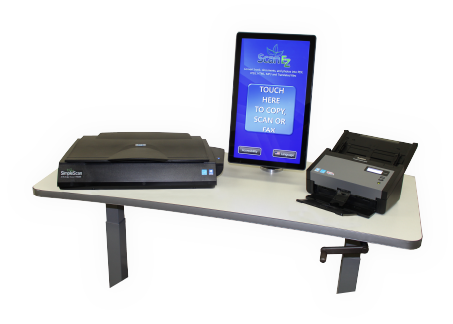
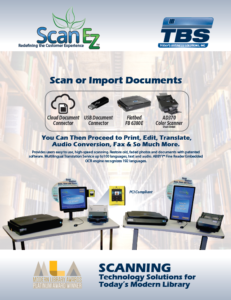
            • Provides users with high-speed scanning, copying, and faxing
            • Restore old, faded photos and documents with Vivid-Pix software
            • Translation to text and audio
            • Patron Friendly Interface
            • Easy-to-follow training videos

            Newest Enhancements In ScanEZ

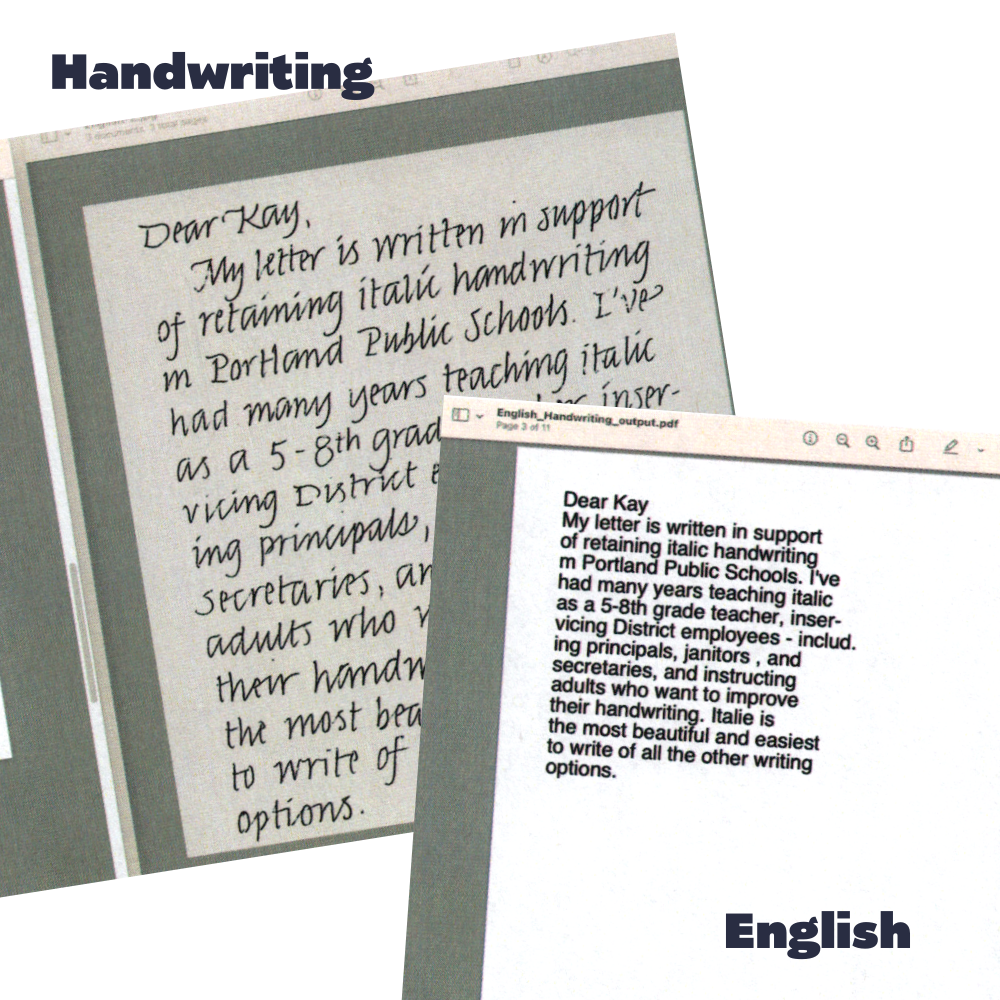
            ScanEZ’s latest update introduces an innovative Handwriting Recognition feature, revolutionizing the way users interact with handwritten documents. Leveraging cutting-edge machine learning algorithms, the software can now accurately convert handwritten letters in English, French, Korean, Japanese, and German into various other languages, expanding its utility to a global audience. This technological advancement marks a significant milestone in document processing, enabling users to seamlessly translate handwritten notes, memos, and other text into their desired language with unparalleled accuracy and efficiency. Whether capturing meeting minutes or transcribing personal notes, ScanEZ empowers users to effortlessly bridge language barriers and unlock new possibilities in communication and collaboration.

            Industry-Leading Functionality Included with Every ScanEZ Station

            Standard 21.5” Touchscreen Computer
            Commercial Grade AiO Touchscreen computer.

            Multilingual User-Interface
            Easy-to-use software available in 25 languages.

            Accessibility
            Magnifier, narrator and a high-contrast for visually impaired users.

            Translation Service to Text & Audio
            Scan and convert up to 100 different languages in text or audio files.

            Patented Image Enhancement
            Restore, preserve, and share photos, documents, newspapers, and historical records.

            Enhanced Email Authentication
            Gmail, Facebook, Outlook.com, Hotmail, and Office Live.

            Cloud-Service Authentication
            For Facebook, Google, DropBox, Box, OneDrive and Office 365.

            Smart Copy Functions
            Smart Copy Functions with reduction and enlargement

            ABBYY® Fine Reader Embedded OCR
            ABBYY Fine Reader engine recognizes 192 languages for OCR.

            Single Pass LED Duplex Scanner

            Patented Book-Edge LED Scanner

            Flexible Charging
            Multi-tiered discounts per output.

            Payment Gateways
            TBS9900, Jamex, ITC, CBORD®, Blackboard™, CBA, PCI Compliant Credit & Debit Card Payment.

            Print Management Integration
            PaperCut, Pharos, PCounter, & more.

            Cloud-Based Fleet Management & Reporting
            Statistical usage, auto-generated reporting, real-time fax details, reconciliation of billed services, auto updates and alerts, troubleshooting, and remote training.

            Full Warranty Coverage
            The warranty includes full hardware and software coverage and can be extended for as long as you have equipment in service. 

            Image Enhancement

            Redefining your Library’s Customer Experience

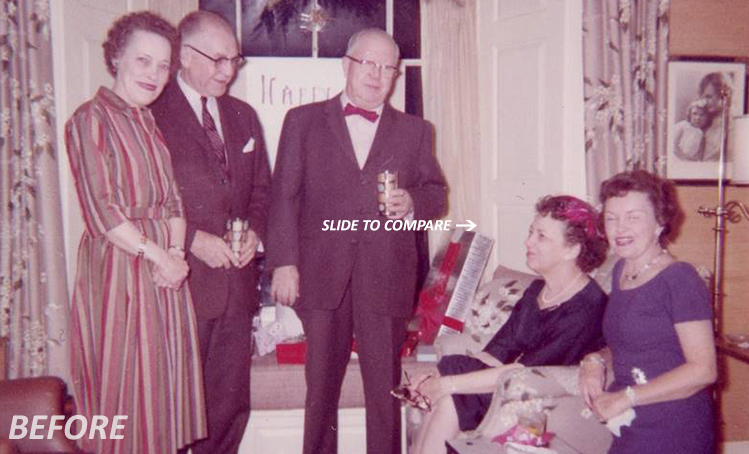
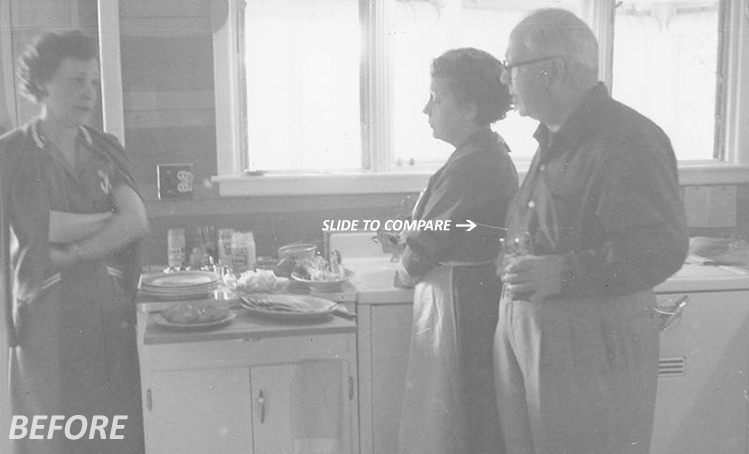
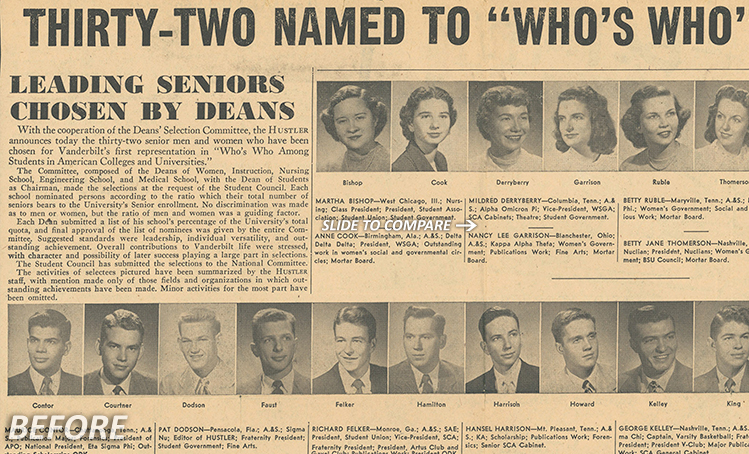
            The ScanEZ station applies patented image science to enhance scanned photos, digital photos, documents, newspapers, and more. This 1-click technology restores memories and history.

            Screen Shot 2019-06-17 at 5.04.03 PM

            RESTORE COLOR, CONTRAST AND CLARITY FROM:

            COLOR

            Before imageAfter image

            BLACK & WHITE

            Before imageAfter image

            SEPIA

            Before imageAfter image

            NEWSPAPERS & DOCUMENTS

            Before imageAfter image

            VIDEOS:

            WATCH VIVID-PIX PATENTED, ONE-CLICK
            IMAGE-ENHANCEMENT IN ACTION
            HEAR WHAT LIBRARIANS AND GENEALOGISTS
            HAVE TO SAY ABOUT VIVID-PIX

            VIVID-PIX RESTORE PATENTED SOFTWARE

            • Artificial Intelligence analyzes every image and adjusts color, contrast, lightness, and sharpness.
            • As everyone sees lightness and contrast differently, 9 corrected images are presented which allows user to choose the image that looks best to them.

            • The original and improved images are presented side-by-side to review

            • The restored image can now be saved or fine-tuned with easy-to-use controls

            MANY COMPARE VIVID-PIX RESTORE WITH OTHER SOFTWARE

            • Often these software’s are terrific products for some users, however they can be difficult to use and remember how to use.
            • Having Kodak roots, Vivid-Pix founders Rick and Randy borrowed a page from George Eastman’s playbook: “You press the button, we do the rest.”
            • Vivid-Pix automatically adjusts what other software’s adjust with histograms, layers, and curves.
            • The resulting improvements are quite spectacular – and easy to achieve.

            WHAT MAKES VIVID-PIX DIFFERENT THAN OTHER SOFTWARE’S “AUTOMATIC ADJUSTMENT”

            • Vivid-Pix patented, Artificial Intelligence, image-correction algorithm’s analyze every image and apply the correction necessary for each image
            • Within this correction is their sharpening technology, which is quite unique

            RESTORE, RELIVE AND SHARE YOUR TREASURED MEMORIES.

            Request Brochure

            For product brochures, send us your info, by filling out the form and we’ll send you the most up to date brochures.

              I would like to get a brochure of ScanEZ:

              [fm_carousel id=”1″]

              Read more

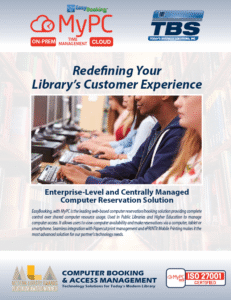
              Computer Booking – MyPC

              Computer Booking & Access Management

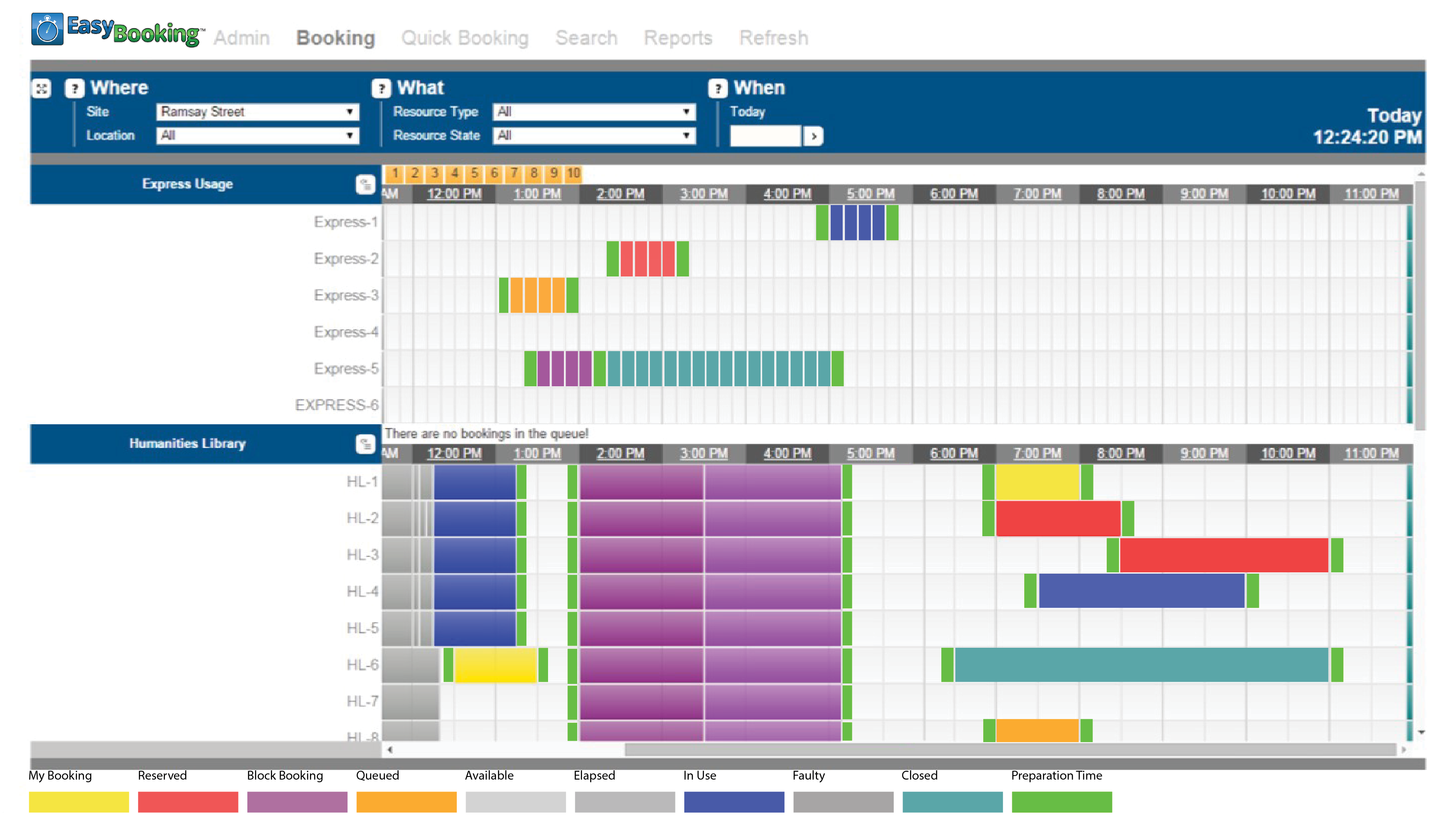
              MyPC is the leading web-based computer booking solution which provides complete control over shared computer resource usage.

              Widely used within education and public libraries, MyPC allows users to view computer availability and make online reservations via a smartphone, tablet or computer. This creates a self-service environment, drastically reducing staff involvement. MyPC eliminates the need for paper-based booking systems or spreadsheets and is fully customizable to incorporate your organization’s colors and logos.

              Filter Bookable Computers

              Where you have a variety of hardware or software offerings, intuitive search filters enable users to easily locate their computer of choice.

              Promote Fair Usage

              MyPC promotes fair usage by determining how often and how long each user is allowed. Restrictions can be tightened during peak times and relaxed when demand for computers is low.

              Messaging

              MyPC enables staff to send messages easily, even anonymously, to any computer user. Whether you use predefined or open text messages, there is no need to physically approach users. Possible confrontations are avoided, cultivating a more studious environment.

              LMS Integration

              Integrates with your library management system to inform users of their library fines and outstanding items and even ban them from reserving a computer until they have addressed the issue. This helps you to get books back on time for other users and reduce costs incurred in sending postal reminders.

              Comprehensive Reports

              Comprehensive reports identify computers that are under or over utilized ensuring the optimum return on investment for your hardware.

              Web Based Usage Statistics

              MyPC provides comprehensive web-based reports, available in a variety of formats including CSV. Anyone who needs statistics can receive them daily, weekly or monthly, delivered automatically by email.

              Booking Receipts

              Print or automatically send email booking receipts to users confirming their bookings.

              End User Authentication

              The TBS-ILS Connector allows authentication of each user prior to login to a PC or MAC computer. Our ILS tool provides the library to utilize multi-rule functionality. TBS can also group users based on ILS data. We also support end-user authentication against your network (including Active Directory, Novell eDirectory, RM or LDAP).

              We do not replace your logon mechanism or require the use of generic or service accounts.

              Power Management

              Power up workstations at opening time using Wake-on-LAN and power them down at closing.

              Multiple Browser Support

              MyPC supports Internet Explorer, Mozilla Firefox, Google Chrome, and Safari.

              Smartphone Booking

              MyPC also includes booking options for iPhone, Android and other smartphones including tablets.

              TBS Staff Portal

              The TBS Staff Portal is the latest in developments from TBS. The Staff Portal provides access for managing Computer Booking, create and print guest passes, manage print jobs that have been submitted, mobile print job management, including the ability to reprint or reroute print jobs submitted and more. The staff portal is a web-enabled centralized dashboard in which staff can perform management tasks. The portal is a browser-based interface that allows staff to log in from any web-enabled device to do their work. staff to reprint sent print jobs that did not print properly and to release patron print jobs.

              Computer Reservation Station

              EasyBooking allows users to book a computer or pay fees and fines in the most appropriate method for your organization. A quick booking option is available, automatically selecting a computer based on a specified date, location and session length. EasyBooking includes booking options from any mobile device, including iPads, iPhones, Androids and Blackberry devices with text notifications.

              Request Brochure

              For product brochures, send us your info, by filling out the form and we’ll send you the most up to date brochures.

                I would like to get a brochure of MyPC:

                [fm_carousel id=”1″]

                Read more
                • 1
                • 2